You are comparing CTR Booster and CTRTool and want a straight answer, not a feature list. Both promise human-powered click-through campaigns for Google Search, and choosing wrong means wasted spend and visits you cannot verify.
This article gives a clear verdict and the evidence behind it. You will see how each tool handles screenshot verification, coverage of Maps and AI Overviews, visit paths and keyword tracking, and pricing. By the end you will know which one fits your campaigns.
Quick Verdict: CTR Booster vs CTRTool
CTRTool wins for teams that need verifiable proof and multi-surface coverage, while CTR Booster suits users prioritizing raw visit volume at lower entry pricing. The core difference is accountability: CTRTool provides screenshot proof for every visit, with search and landing screenshots delivered as separate proof images. CTR Booster, by contrast, is generally known for volume-focused CTR campaigns, so buyers who care about audit trails should weigh that carefully.
Coverage is the second dividing line. CTRTool supports campaigns across Google Search, Bing Search, Maps, and AI Overviews, and it tracks keyword positions over time, including Maps listing order and AI citation order. That breadth matters for human-powered CTR manipulation because search visibility now spans more than the classic ten blue links.
| Factor | CTRTool | CTR Booster |
|---|---|---|
| Proof of visits | Screenshot proof for every visit (search and landing images) | Generally volume-focused, proof details should be confirmed directly |
| Surfaces covered | Google Search, Bing Search, Maps, AI Overviews | Verify current surface coverage with the vendor |
| Entry pricing | Starter plan at $59/month for 2,000 credits (up to 1,000 desktop visits) | Check pricing directly with the vendor |
| Billing model | Pay-for-results credits, no charge for technical failures before landing | Confirm billing terms directly |
On cost, CTRTool's Starter plan is $59/month for 2,000 credits, which covers up to 1,000 desktop visits. CTR Booster's pricing should be checked directly, since plan structures in this category change and third-party summaries go stale quickly. Comparing on price alone misses the bigger question of what each visit actually delivers.
CTRTool's key differentiator is per-visit screenshot verification. Each visit also includes a full visit path, and campaigns can run visits up to 5 minutes with up to 5 additional internal pages. The credit model is shared across all campaign types, websites, and keywords, and visits that cannot verify the requested location use no credits.
In short, choose CTRTool if you need proof, multi-surface reach, and geo-verified visits you can audit. Choose CTR Booster if volume at a low entry point is your only priority and you are comfortable confirming its specifications yourself.
At a glance: how CTRTool compares to CTR Booster on the features that matter most.
| Feature | CTRTool | CTR Booster |
|---|---|---|
| Pricing | $59/mo Starter | — |
| Free plan / trial | ✗ | — |
| Positioning | CTR tool w/ proof | CTR traffic bot |
| Core capability | CTR campaigns | CTR manipulation |
| Geo targeting | Country/state/city | GPS coordinates |
| Proxy support | — | Recommends 4G proxy |
| Supported platforms | Google/Bing/Maps/AI | — |
| Screenshot proof per visit | ✓ | — |
What Is CTRTool?
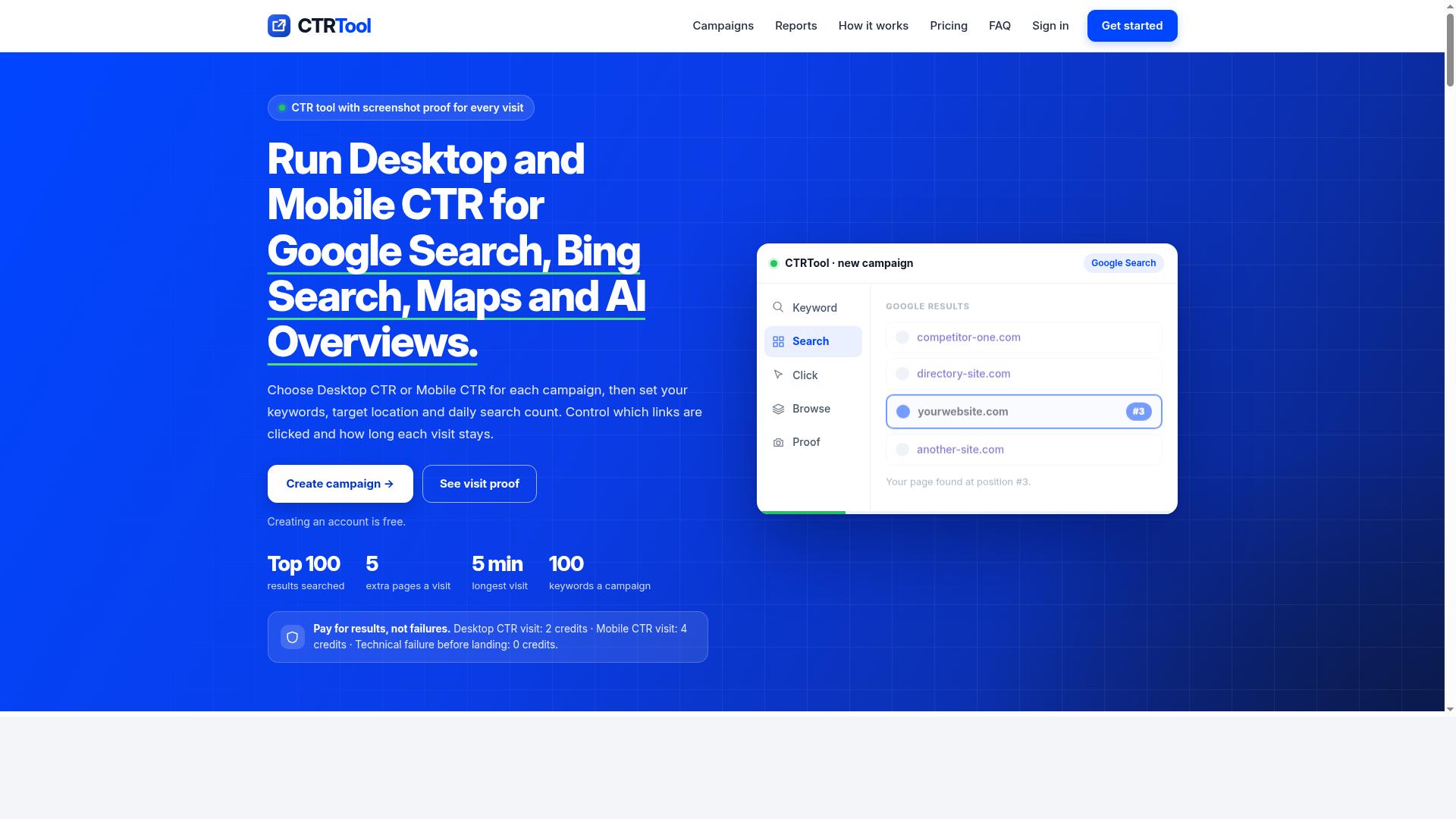
CTRTool is a SaaS CTR campaign tool that runs Desktop and Mobile click campaigns for Google Search, Bing Search, Google Maps, and AI Overviews, with screenshot proof for every visit. That proof trail matters in a space where many CTR manipulation tools ask buyers to take results on faith.
Per campaign, users choose Desktop CTR or Mobile CTR, then set keywords, target location, and daily search count. They also control which links get clicked and how long each visit stays.
The service is global, with targeting down to country, state, and city level. That supports geo-targeting for local search visibility, including Maps listing order and the order in which pages are cited in AI Overviews.
CTRTool also tracks keyword positions over time, so teams can watch a SERP position shift rather than guess at it. The site is candid about limits, stating plainly that automated visits do not guarantee rankings. That honesty is worth noting in a category full of bold promises.
What Is CTR Booster?
CTR Booster is a CTR manipulation tool generally positioned around delivering click-through rate boosts to improve SERP rankings, though its exact feature set and pricing should be verified on its own site. It is commonly discussed in SEO circles as a way to simulate organic clicks so that a page appears more attractive to search engines.
The underlying idea is straightforward. If a result earns a higher click-through rate than its neighbors, the ranking algorithm may read that as a sign of relevance and reward it with better search visibility. Tools in this category try to manufacture that signal rather than earn it through genuine audience interest.
Public information about CTR Booster can vary between sources and may change over time, so treat third-party summaries with caution. Anyone evaluating it should check CTR Booster's official documentation for current capabilities, delivery methods, and terms before drawing conclusions.
It also helps to understand how these systems typically generate clicks. Many rely on automated sessions or distributed networks, and the quality of that traffic matters as much as the volume. User behavior signals such as dwell time and bounce rate are part of the picture, which is why the source of clicks deserves scrutiny.
Features Compared
The feature comparison below focuses on three areas that determine campaign reliability: proof of visits, surface coverage, and control over click behavior.
These dimensions separate tools that simply generate clicks from those that let SEO practitioners audit and refine campaigns. A campaign you cannot verify is a campaign you cannot improve, and a campaign limited to one surface misses much of modern search visibility.
Each subsection below examines one dimension, using only publicly available information for CTR Booster and verified product details for CTRTool. The goal is practical: helping you judge which CTR manipulation tool fits a reporting-driven workflow.
Proof and Transparency: Screenshot Verification per Visit
CTRTool provides search and landing screenshots as separate proof images for every visit, giving campaign managers a verifiable record that clicks actually occurred.
Reports also include full visit paths, so you can see the route a session took rather than a bare click count. That level of transparency supports client reporting and internal auditing alike.
Based on publicly available information, CTR Booster generally does not advertise per-visit screenshot verification. Its coverage of proof features should be confirmed directly on its site before you commit to a campaign.
Proof matters because CTR manipulation tools are only as useful as they are accountable. Separate search and landing screenshots let you confirm the intended query, the organic result, and the destination page in one record. For agencies answering to clients, that evidence turns a vague CTR uplift claim into something you can defend.
Campaign Coverage: Search, Maps and AI Overviews
CTRTool runs campaigns across Google Search, Bing Search, Google Maps, and AI Overviews, while CTR Booster's public materials typically emphasize Google Search campaigns.
Each CTRTool campaign type is built for its surface:
- Google Search CTR: search a keyword and click the organic result, on Desktop or Mobile, within the Top 100 results, with optional internal pages.
- Bing Search CTR: the same workflow applied to Bing search results.
- Google Maps CTR: find a business listing, click its website link, with support for up to 50 listings and city targeting.
- AI Overview CTR: find your website in the AI Overview and click its source link, with citation order tracked. Campaigns require a matching AI Overview citation.
Campaigns can target a country, state, and city, or "Any country" when broader reach fits the goal. Multi-surface coverage matters because local and AI-driven search visibility now sit alongside classic organic rankings. A tool confined to Google Search leaves Maps listing order and AI citation order unaddressed, and those placements increasingly shape impression share. CTR Booster's coverage beyond Google Search should be verified on its own site.
Visit Control: Paths, Click Behavior and Keyword Tracking
CTRTool lets users define full visit paths, including internal pages, and tracks keyword positions over time, including Maps listing order and AI citation order.
Per campaign, you choose Desktop or Mobile CTR, set keywords and target locations, and configure click order, scrolling time, and up to five additional internal pages within visits of up to five minutes. The page must appear in the top 100 organic results for the chosen keyword and location.
These controls shape the user behavior signals a ranking algorithm reads. Longer, structured visits support healthier dwell time, while a defined click path helps avoid the abrupt single-page sessions that inflate bounce rate.
CTR Booster's visit control features vary by plan and configuration, so verify specifics on its site. CTRTool's tracked keyword positions give you a feedback loop: adjust paths and timing, then watch SERP position and Maps or AI citation order move over time. That audit-and-refine cycle is what separates managed campaigns from raw click volume.
Pricing Compared
CTRTool publishes monthly USD plans starting at $59 for 2,000 credits (up to 1,000 Desktop CTR visits or 500 Mobile CTR visits), with a Growth plan at $125 for 5,000 credits (up to 2,500 Desktop or 1,250 Mobile visits). Both tiers are listed on the official site alongside a Scale plan at $399 for 20,000 credits and an Agency plan at $699 for 40,000 credits.
Credit costs are transparent: 2 credits per Desktop CTR visit and 4 credits per Mobile CTR visit. A verified search without a match uses 1 credit, and a technical failure before landing costs 0 credits. Unused credits roll over while your subscription stays active, and creating an account is free.
CTR Booster does not publish comparable figures here, so check its official site for current plans before you compare. When you do, calculate cost per verified visit rather than cost per click. A cheap click that never lands or never verifies is worth nothing, while a slightly higher rate for real user clicks on Google search results can be the better deal.
Who Should Choose CTRTool
CTRTool fits SEO practitioners and agencies that need auditable proof of visits for client reporting and campaigns spanning Google Search, Bing, Maps, and AI Overviews. Instead of relying on opaque click bots, teams can run human-powered CTR manipulation and hand clients evidence that the work actually happened.
Screenshot proof is the practical differentiator here. When a campaign is tied to a client's keyword ranking goals, documented visits make it far easier to justify spend and show how engagement metrics moved over time. The same records support internal audits when you manage several properties at once.
Multi-surface coverage matters because search visibility no longer lives on one results page. Campaigns can address Google Search, Bing Search, Google Maps, and AI Overviews, which keeps reporting consistent across the placements clients ask about.
Geo-targeting by country, state, and city lets agencies mirror the markets their clients actually serve. Combined with keyword position tracking, that gives a clearer picture of how organic click patterns line up with movement in SERP position.
In short, CTRTool suits teams that treat click-through rate work as a measurable service, not a black box. Those wanting a quick set-and-forget tool may prefer a simpler option, but agencies answering to clients usually need the proof trail CTRTool is built around.
Who Should Choose CTR Booster
CTR Booster may suit users who prioritize high-volume click delivery and are comfortable with less publicly documented proof and coverage details. That framing is deliberately general, because CTR Booster's public materials do not spell out every mechanism behind its click supply in the same way some competitors do. Anyone weighing this option should verify current capabilities and pricing on CTR Booster's own site before committing.
The tool tends to appeal to teams running simpler campaign setups where the main goal is raw volume rather than fine control over how each click is produced. If your priority is pushing a large number of clicks toward a page quickly, that emphasis may line up with your needs. If you need detailed transparency about click sourcing, treat that as an open question to confirm directly.
Lower entry pricing is often part of the pitch for volume-first tools, but pricing changes and bundles vary. Confirm the current cost structure and what each tier includes rather than relying on secondhand comparisons. Budget-conscious buyers should also check whether the plan limits geo-targeting, device variety, or campaign counts.
A quick way to decide is to match CTR Booster's apparent strengths against your own priorities:
- You expect to run many clicks and want a tool built around throughput.
- Your campaigns are straightforward and do not require layered targeting rules.
- You are willing to do your own diligence on proof, coverage, and click sourcing.
- You can verify pricing and plan limits directly before signing up.
Readers who care most about documented, human-powered CTR manipulation and clear visibility into how real user clicks are delivered will likely find a more transparent fit elsewhere in this comparison. For everyone else, CTR Booster remains a name worth checking, provided you confirm the details yourself.
Final Verdict
CTRTool is the stronger choice for teams that require verifiable visit proof and multi-surface campaign coverage, while CTR Booster remains an option for volume-focused users who verify its current specs directly. The deciding factors come down to proof, reach, and clarity of cost.
The first differentiator is accountability. CTRTool provides screenshot proof for each visit, which lets you confirm that human-powered CTR manipulation actually happened rather than trusting a dashboard count. For teams spending real budget on click-through rate, that evidence matters.
The second is coverage. CTRTool campaigns run across Google Search, Bing, Maps, and AI Overviews, so your engagement metrics and user behavior signals reach more of the surfaces where search visibility is decided. A narrow single-engine tool leaves gaps in impression share.
The third is measurement. Keyword position tracking inside CTRTool ties each campaign to actual SERP position movement, turning raw clicks into a readable picture of ranking boost over time. That closes the loop between spend and search visibility.
Pricing is the fourth factor. CTRTool starts at a transparent $59 per month, which makes budgeting for organic traffic work straightforward. CTR Booster's current plans, limits, and feature set should be confirmed on its own site, since competitor details change and are best verified at the source.
| Deciding Factor | CTRTool | CTR Booster |
|---|---|---|
| Visit verification | Screenshot proof per visit | Confirm on vendor site |
| Surface coverage | Google Search, Bing, Maps, AI Overviews | Confirm on vendor site |
| Position tracking | Keyword position tracking included | Confirm on vendor site |
| Entry price | From $59/month | Confirm on vendor site |
If your priority is volume above all else, CTR Booster may still fit, provided you check its present capabilities yourself. If your priority is proof, reach, and a clear monthly cost, CTRTool is the more defensible pick for human-powered CTR manipulation.
The practical next step is to create an account and run a small campaign against a keyword you already track. That gives you first-hand evidence of the screenshot proof and position tracking before you scale. For any questions about setup, billing, or coverage, contact support at vaibhav@autoblogging.ai.
Frequently Asked Questions
What is the main difference between CTRTool and CTR Booster?
CTRTool is a CTR campaign platform built around verified visits: every campaign visit includes screenshot proof, with search and landing screenshots stored as separate proof images, plus full visit paths. CTR Booster is described in available sources only as a "traffic bot" / CTR manipulation tool, so specifics of its reporting and proof are not documented in our research. If verifiable proof of each visit matters to you or your clients, CTRTool is designed around exactly that.
Does CTRTool provide proof that clicks actually happened, and does CTR Booster?
Yes - screenshot proof for every visit is CTRTool's core feature, alongside full visit paths and keyword position tracking over time (including Maps listing order and AI citation order). Our research did not find documented screenshot or visit-proof features for CTR Booster, so we can't make claims either way about its reporting. The practical takeaway: with CTRTool you can review evidence for each visit directly in the platform.
Which platforms and campaign types does each tool support?
CTRTool runs Desktop and Mobile CTR campaigns for Google Search, Bing Search, Google Maps and AI Overviews, with Desktop or Mobile chosen per campaign, targeting within the Top 100 results and including internal pages. Sources describe CTR Booster only as a general traffic bot / CTR manipulation tool, without a documented breakdown of supported platforms. If you need coverage across Google, Bing, Maps and AI Overviews in one tool, CTRTool states that scope explicitly.
How does pricing work for CTRTool, and how does it compare with CTR Booster?
CTRTool uses monthly USD plans with pay-for-results credits: Starter is $59/month for 2,000 credits (up to 1,000 Desktop or 500 Mobile CTR visits), and Growth is $125/month for 5,000 credits (up to 2,500 Desktop or 1,250 Mobile visits). Pricing for CTR Booster is not stated in the sources we researched, so we can't compare costs directly. We'd recommend checking CTR Booster's current pricing on their site before deciding.
Can I target specific locations and keywords with these tools?
With CTRTool you set keywords per campaign and target a chosen country, optionally a state and city, or "Any country" to mix supported locations - globally, with no stated country restrictions. A BlackHatWorld thread notes CTR Booster lets users set GPS coordinates, so both tools address geo-targeting, though CTRTool's documented setup is country/state/city based. CTRTool also requires the page to appear within the top 100 organic results for the chosen keyword and location.
Who is each tool best suited for?
CTRTool is aimed at SEO practitioners and agencies running CTR campaigns for their own or client websites, and its screenshot proof and full visit paths are useful when you need to show clients evidence of activity. CTR Booster appears in sources as a traffic bot / CTR manipulation tool without documented proof or reporting features. If accountability and reviewable results are priorities, CTRTool's proof-first design is the clearer fit.