You can buy thousands of clicks and still watch your keyword sit on page two. Rank tracking alone will not tell you whether a tool's visits look like real searches, hit the right location, or leave the kind of behavioural footprint Google, Bing, Maps and AI Overviews actually read.
This article gives you a practical buying framework: what proof of visits should look like, how platform coverage and campaign controls differ between tools, and how billing and failure protection work. By the end you will know whether CTRTool fits your rankings, and how to judge any CTR tool before you pay.
What Is CTRTool? A CTR Campaign Tool for Google, Bing, Maps and AI Overviews
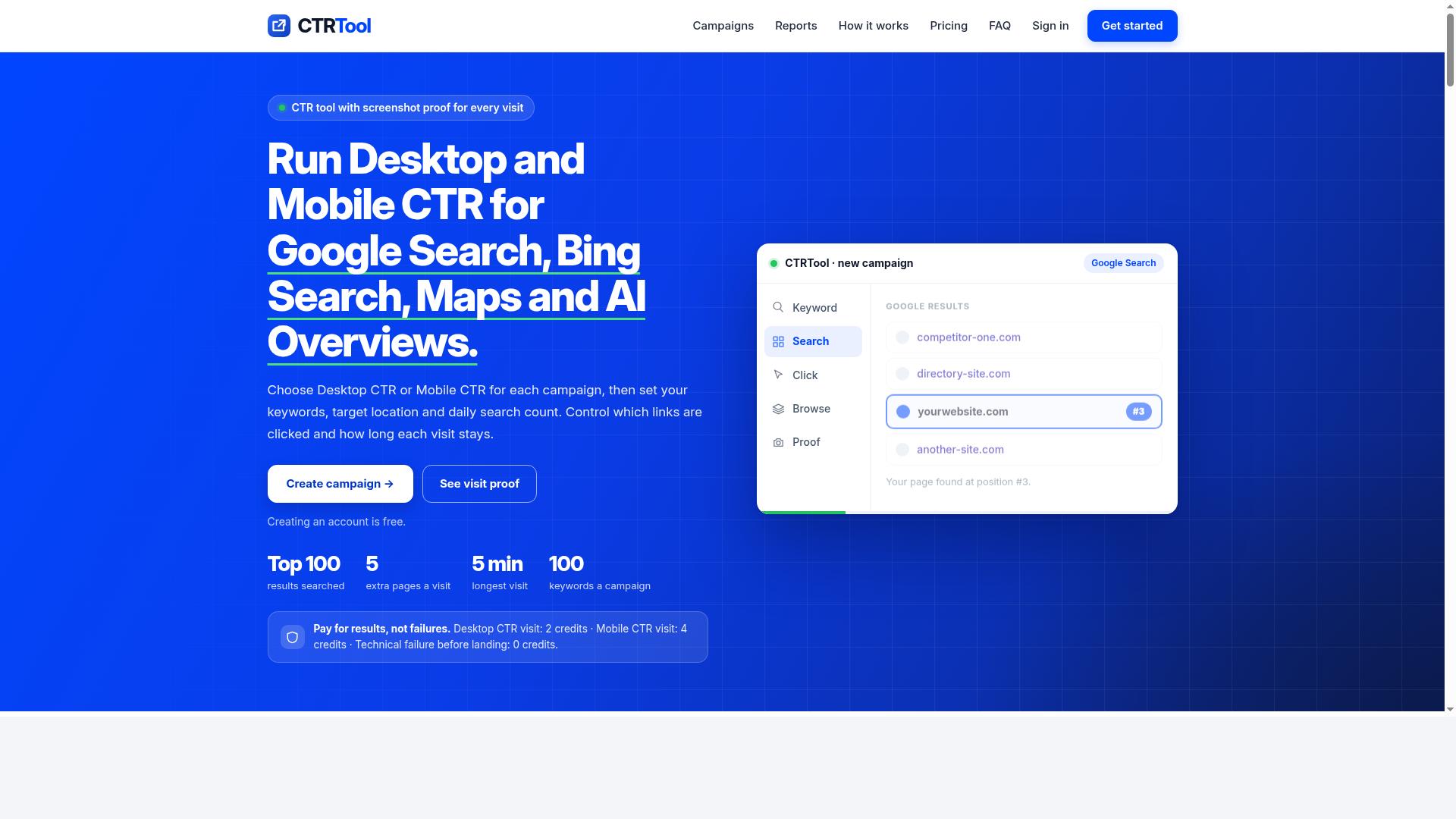
CTRTool is a SaaS platform that runs desktop and mobile CTR campaigns for Google Search, Bing Search, Google Maps, and AI Overviews, providing screenshot proof for every visit.
Users set keywords, target location, and daily search count, then control which links get clicked and how long each visit stays. You choose Desktop CTR or Mobile CTR per campaign, so the click-through rate signal matches the device you want to influence.
Because every visit is verified with screenshots, the activity is auditable rather than assumed. CTRTool itself states that automated visits do not guarantee rankings, a caveat worth keeping in mind as you weigh the criteria that follow.
The Selection Criteria That Matter - and How CTRTool Measures Up
When evaluating a CTR tool, the criteria that separate a reliable service from a risky one include verifiable proof, platform coverage, campaign control, tracking depth, and fair billing. These five points determine whether a CTR campaign is effective, safe, and transparent.
Weak proof hides failed clicks, narrow coverage limits where campaigns can run, and loose controls invite detection. Poor tracking leaves you guessing about results, while unfair billing charges you for visits that never landed.
The subheadings below examine CTRTool against each criterion in turn.
Proof of Every Visit: Screenshot Verification
Screenshot verification is the ability to see visual evidence of each simulated visit, confirming that the click actually occurred and the landing page loaded. Without it, you are trusting a click counter that anyone could inflate.
CTRTool provides search and landing screenshots as separate proof images for every visit. One image shows the result being clicked in the SERP, and the other shows the destination page after arrival. That pairing gives you auditability, not just a number in a dashboard.
Many tools report only click totals with no visual evidence. If a click bot fails to load the page, a count-only report cannot tell you. Screenshot proof closes that gap because you can inspect the actual visit.
This evidence also helps when reporting to clients. You can verify campaign delivery with images rather than assurances, which builds trust in the work and in the reporting behind it.
Platform Coverage: Desktop, Mobile, Maps and AI Overviews
Platform coverage determines where a CTR tool can simulate clicks, from traditional desktop search to mobile results, local map listings, and AI-generated overviews. Search behavior has diversified, so a tool limited to one surface misses much of the picture.
CTRTool supports four campaign types:
- Google Search CTR, clicking an organic result for a keyword in the top 100 results, on Desktop or Mobile
- Bing Search CTR, the same approach applied to Bing results
- Google Maps CTR, finding a business listing and clicking its website link, with up to 50 listings checked (about five pages)
- AI Overview CTR, finding your website in the overview and clicking its source link, which requires a matching citation
Each campaign lets you choose desktop CTR or mobile CTR, so device-specific targeting is part of setup rather than an afterthought. Mobile and desktop traffic behave differently, and matching the device to your audience keeps signals consistent.
Covering Maps and AI Overviews matters because local and AI-driven results now sit alongside classic organic listings. A campaign plan that ignores them leaves visible surfaces unaddressed.
Campaign Control: Keywords, Location, Daily Search Count and Click Behaviour
Campaign control is the ability to fine-tune keyword selection, geographic targeting, daily search volume, and click patterns to mimic natural user behavior. The more precisely you can shape these inputs, the more your traffic resembles genuine engagement signals.
CTRTool lets you set up to 100 keywords per campaign and target a country, state, and city, or choose Any country for a natural mix of locations. Search depth reaches up to 100 results, so you can define how far into the SERP a visit should look.
Daily search counts can run immediately, spread out, or with set gaps, across chosen days, hours, and time zone, with daily goals resetting at 00:00 UTC. Click order, scrolling time, and visits of up to five minutes with up to five additional internal pages add further realism.
Randomization and pacing are what keep a campaign from looking mechanical. Predictable timing and identical sessions raise detection risk, so spreading searches and varying dwell time and bounce behavior protects the campaign. These controls let you tailor each run to a specific ranking goal instead of accepting a one-size-fits-all pattern.
Tracking and Reporting: Keyword Positions, Maps Order and AI Citation Order
Tracking and reporting features show how keyword positions change over time, including Maps listing order and AI citation order, providing measurable outcomes for CTR campaigns. CTRTool tracks keyword positions over time for Google and Bing, so you can see whether a CTR uplift lines up with real movement in search rankings.
The platform also monitors Maps listing order and records AI citation order. That matters because a click-through rate campaign is only useful if you can connect the activity to visible ranking changes across surfaces, not just one results page.
CTRTool goes further with full visit paths and screenshot proof for every visit. Search and landing screenshots are stored as separate proof images, so each visit can be reviewed rather than taken on trust.
Full visit paths let you analyze how sessions actually unfolded, from the search query through to internal pages. Visits can last up to 5 minutes with up to 5 additional internal pages, giving you dwell time and session data worth reviewing when you refine keyword targeting and campaign pacing.
Transparent reporting builds confidence in the tool's effectiveness. When positions, Maps order, AI citations and visit proof sit in the same view, you can judge results on evidence instead of assumption.
Billing Fairness: Pay-for-Results Credits and Failure Protection
Billing fairness in a CTR tool means you pay only for successful visits, with credits not consumed when a campaign fails to deliver a visit. CTRTool uses a credit-based system where credits are deducted per successful visit, and failed attempts do not consume credits.
The credit costs are clear and published:
- Desktop CTR visit: 2 credits
- Mobile CTR visit: 4 credits
- Verified search without a match: 1 credit
- Technical failure before landing: 0 credits
This protects users from paying for clicks that didn't happen. Visits that cannot verify the requested location also use no credits, so geo-targeting misses don't quietly drain your balance.
Contrast this with tools that charge per click attempt regardless of outcome. Under that model, a failed visit, a blocked session or a location mismatch still costs money, even though no organic traffic reached the page.
The pay-for-results model aligns costs with actual delivery. One credit balance is shared across all campaign types, websites and keywords, and unused credits roll over while your subscription stays active. With up to 100 campaigns of 100 keywords each, that shared balance keeps budgeting simple across every campaign you run.
Key Features and What Makes CTRTool Stand Out
CTRTool distinguishes itself through features like screenshot proof for every visit, full visit paths, and detailed tracking of keyword positions across multiple platforms. For anyone weighing a CTR manipulation tool, these are the details that separate a verifiable campaign from a blind guess.
The screenshot verification captures both the search results view and the landing page for each visit. That means you can confirm the click happened on the right query and landed on the intended page, rather than trusting a dashboard number alone.
Full visit paths show how a session moves from search to site, which helps you judge whether SERP behavior looks natural. Keyword position tracking extends beyond standard Google results to include Maps and AI citation order, giving a clearer picture of where a target actually appears.
Campaigns can run on desktop or mobile per platform, so device emulation matches real audience patterns. Location targeting adds another layer of control for geo-specific keywords.
The pay-for-results credit system ties spending to delivered activity rather than flat fees. CTRTool covers Google Search, Bing Search, Maps and AI Overviews, with proof for every visit. Together, these features lower detection risk and make campaign outcomes easier to measure.
Pricing and Plans
CTRTool offers monthly subscription plans in USD: Starter at $59/month for 2,000 credits (up to 1,000 desktop CTR visits or 500 mobile CTR visits) and Growth at $125/month for 5,000 credits (up to 2,500 desktop or 1,250 mobile visits). Two larger tiers round out the lineup for higher-volume campaigns.
| Plan | Price | Credits | Desktop Visits | Mobile Visits |
|---|---|---|---|---|
| Starter | $59/month | 2,000 | Up to 1,000 | Up to 500 |
| Growth (Recommended) | $125/month | 5,000 | Up to 2,500 | Up to 1,250 |
| Scale | $399/month | 20,000 | Up to 10,000 | Up to 5,000 |
| Agency | $699/month | 40,000 | Up to 20,000 | Up to 10,000 |
Credits are consumed per successful visit. A desktop CTR visit costs 2 credits and a mobile visit costs 4, so mobile campaigns draw down balances twice as fast. A verified search without a match costs 1 credit, while a technical failure before landing costs 0 credits.
Plan selection comes down to campaign volume. Starter suits small keyword sets and early testing, Growth covers steady mid-size campaigns, and Scale or Agency fit broad keyword targeting across many pages. Creating an account is free, and note that prices are set to rise 30% on November 15.
Trust Signals: Eligibility Rules, Proof and Transparent Terms
Trust in a CTR tool is built on clear eligibility rules, verifiable proof of visits, and transparent terms of service. CTRTool puts each of these front and center, which is why it stands out as a credible choice for anyone running a CTR manipulation tool campaign.
The platform sets defined eligibility rules before a campaign can run, so users know exactly what qualifies. These rules keep campaigns grounded in realistic SERP behavior rather than blind click volume.
- Organic campaigns: the page must appear within the top 100 organic results for the chosen keyword and location.
- Maps campaigns: the tool checks up to 50 listings, roughly five pages of results.
- AI Overview campaigns: a matching source link or citation is required.
Every visit comes with screenshot proof, giving users a verifiable record of activity instead of asking them to take results on faith. The site also publishes transparent legal notices and terms of use, including clear sourcing for its location data through the CountryStateCity package under open database licenses.
Together, these rules and proofs lower detection risk by keeping activity tied to real, eligible search results, and they build user confidence. CTRTool is also upfront that it does not guarantee higher rankings, leads or sales, an honest stance that reinforces its credibility.
Who Should Use CTRTool
CTRTool is designed for SEO practitioners and agencies running CTR campaigns for their own or client websites across Google Search, Bing Search, Google Maps, and AI Overviews. The platform fits teams that already understand how user engagement signals feed into search performance and want a structured way to act on that knowledge.
Freelance SEO consultants and in-house specialists can use the tool to support their own properties, while agencies can run campaigns across multiple client accounts. The site's guidance also references tier links, PBNs, and test properties, so practitioners following those strategies will find the tool aligns with their existing workflows.
Because CTRTool includes geo-targeting options, it suits both local campaigns, such as a business competing in a single city, and broader campaigns that need to simulate clicks from multiple regions. Device emulation and search query simulation further support campaigns aimed at different audience segments.
For agencies, the screenshot proof and reporting features add practical value. These outputs make it easier to show clients what was delivered and back up campaign activity during reviews. Website owners who manage their own rankings also benefit from the same visibility into what a campaign produced.
In short, CTRTool is a strong fit for anyone serious about influencing search rankings through simulated organic clicks, whether they operate solo or manage campaigns at agency scale.
Final Verdict: Is CTRTool the Right CTR Tool for Your Rankings?
CTRTool presents a compelling option for SEO professionals seeking a CTR tool with verifiable proof, broad platform coverage, and fair billing, though its effectiveness depends on proper campaign setup and adherence to eligibility rules.
Its strongest asset is screenshot proof, which lets you confirm that clicks actually landed rather than trusting a dashboard summary. The tool also covers multiple platforms, so a single campaign strategy can extend beyond one search engine, and detailed tracking keeps every campaign measurable.
The pay-for-results credits model adds another layer of fairness. You fund what you use, which suits professionals who want control over spend and clear visibility into where budget goes.
Limitations deserve honest mention. Campaigns require the target pages to rank within the top 100, so the tool supports pages with existing footing rather than creating rankings from nothing. Results can also vary by niche and competition, since SERP behavior differs across markets.
Overall, CTRTool fits users who value transparency and control over vague promises. If verifiable clicks, multi-platform reach, and results-based billing matter to you, it is a sound choice. Support is available via vaibhav@autoblogging.ai for questions before you commit.
Frequently Asked Questions
What should I look for in a CTR manipulation tool before buying?
Prioritize verifiability, targeting control, and transparent credit usage. CTRTool is built around screenshot proof for every visit, with separate search and landing screenshots and full visit paths, so you can confirm each campaign actually ran. You should also check that the tool supports the surfaces you care about-Google Search, Bing Search, Maps, and AI Overviews-and lets you choose Desktop or Mobile CTR per campaign.
How do I know the clicks are actually happening?
Ask for proof, not just reports. CTRTool provides screenshot proof for every visit, including search and landing screenshots as separate proof images, plus full visit paths and keyword position tracking over time. That lets you audit results rather than trusting a dashboard summary alone.
Can I target specific keywords, locations, and devices?
Yes-targeting is the core of a well-run campaign. With CTRTool you set keywords per campaign, choose Desktop CTR or Mobile CTR, and target a country with an optional state and city, or select "Any country" to use a mix of supported locations. Campaigns run against the top 100 organic results for Google and Bing Search.
Does CTR manipulation work for Google Maps and AI Overviews?
CTRTool supports Google Maps CTR campaigns, which find your business listing and click its website, checking up to 50 listings (about five pages). AI Overview campaigns require a matching source link, so make sure your page is eligible before launching. Both are available alongside standard Google and Bing Search campaigns.
How does CTRTool's pricing and credit system work?
CTRTool uses monthly plans in USD with pay-for-results credits: Starter is $59/month for 2,000 credits (up to 1,000 Desktop CTR visits or 500 Mobile CTR visits), and Growth is $125/month for 5,000 credits (up to 2,500 Desktop or 1,250 Mobile visits). Because Mobile visits consume more credits than Desktop, choose your device mix with that in mind. Check the site for the full plan lineup before committing.
What are the eligibility requirements for a campaign to run?
Your page must appear within the top 100 organic results for the chosen keyword and location-otherwise the campaign can't find and click it. Maps campaigns need a findable business listing, and AI Overview campaigns need a matching source link. Confirm these basics first, then set keywords, device type, and location in CTRTool.